➡️ Connect TradingView via Webhook
The TradingView integration via Webhook is in beta. Please use it with a demo account to ensure everything works as expected.
Webhooks require some technical knowledge of JSON formatting and general web request concepts. If you are not familiar with these topics, we recommend using the more straightforward solution of connecting TradingView with a supported broker directly.
TradingView webhooks allow you to send automated trading alerts directly to external systems. By connecting them to MetaCopier, you can automatically execute and copy trades based on TradingView alerts and Pine Scripts without manual intervention. This guide shows how to set up and use TradingView webhooks with MetaCopier.
What is webhook? A webhook is a way for one platform to automatically send information to another platform in real time.
In the case of TradingView and MetaCopier, a webhook allows TradingView to send a message to MetaCopier whenever an alert is triggered. This message can contain trading instructions such as open a trade, close a trade, or modify a position. MetaCopier receives the message and executes the action on the connected trading account automatically.
In simple terms, a webhook acts like a messenger that instantly delivers TradingView alerts to MetaCopier so trades can be executed automatically.
Requirements
To use TradingView webhooks with MetaCopier, you need the following:
- One trading account connected to MetaCopier
- A TradingView account
Quick Start
Enable the Feature
On the trading account where you want positions to be opened or closed, add the “TradingView Webhook” feature in MetaCopier:

A new window with the TradingView Webhook configuration will open. For now, leave the default settings and save them. Each setting is explained in the Advanced Guide below.
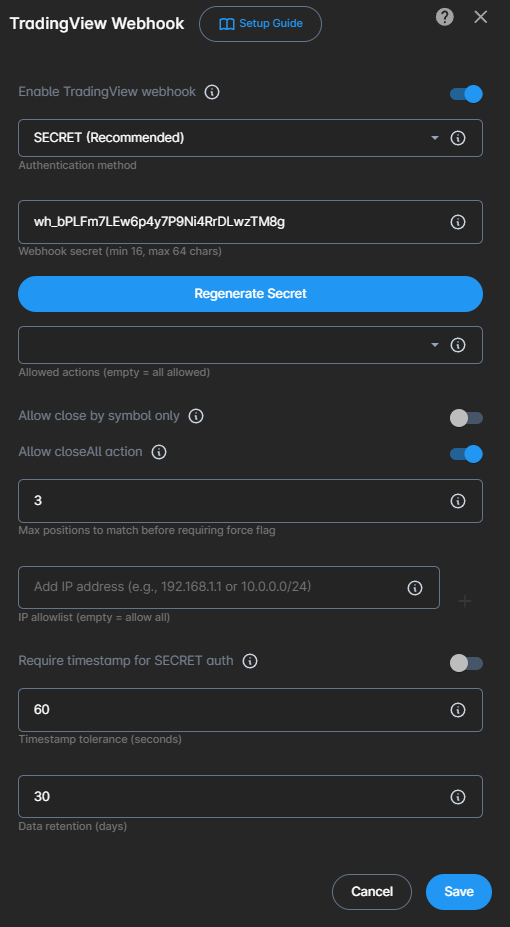
Configure a New Alert
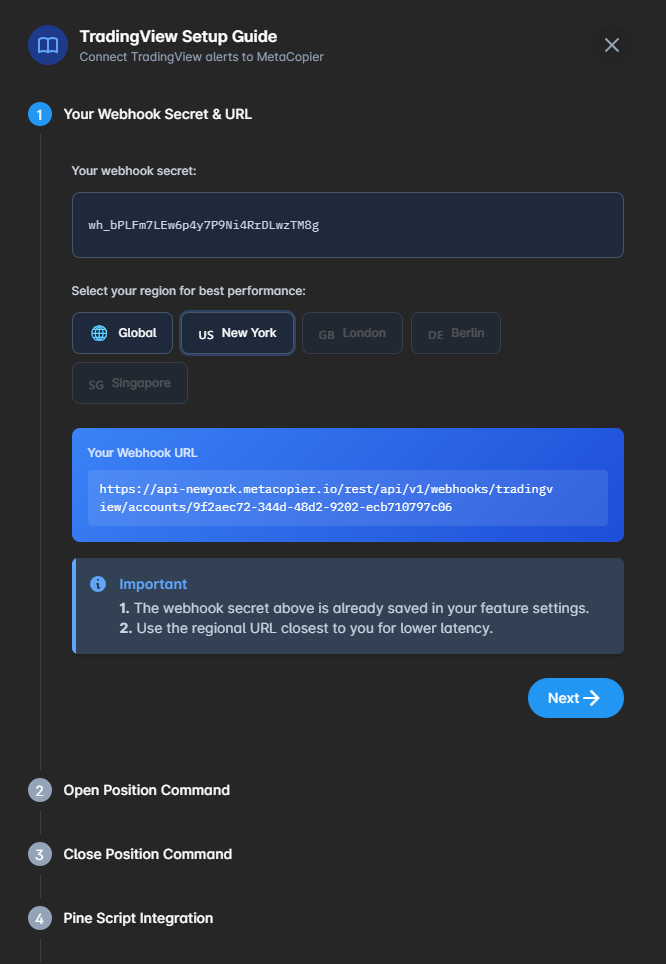
Open the TradingView webhook feature (edit button) and select the Setup Guide at the top.

A new window will open where you will find all the information required for the TradingView webhook.
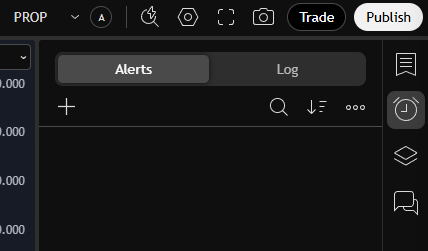
In TradingView, open the desired chart (in this example, XAUUSD). Then, in the top-right corner, open the Alerts section and create a new alert with the "+" symbol.
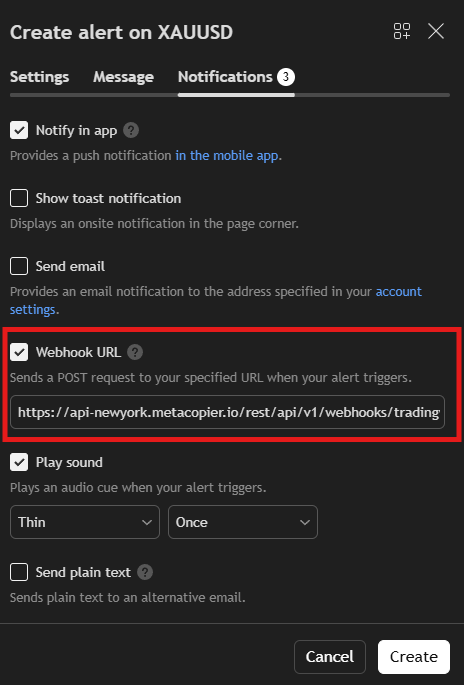
A new window will open. The first step is to define the Webhook URL, which is where the alerts will be sent. Open the Notifications tab and enter the URL shown in the MetaCopier Setup Guide into the Webhook URL field.
Switch to the Message tab in TradingView, where you can define how the message sent to MetaCopier will be formatted. The message must be formatted as JSON and includes the instructions for MetaCopier. Below is a simple example that opens a buy position for XAUUSD with 0.1 lot size.
{
  "secret": "your_secret_minimum_16_chars",
  "action": "open",
  "symbol": "XAUUSD",
  "orderType": "buy",
  "volume": 0.1
}
In TradingView, it will look like this. Please make sure that the rectangle containing the JSON message is green. If it is orange, it means the JSON contains formatting errors.
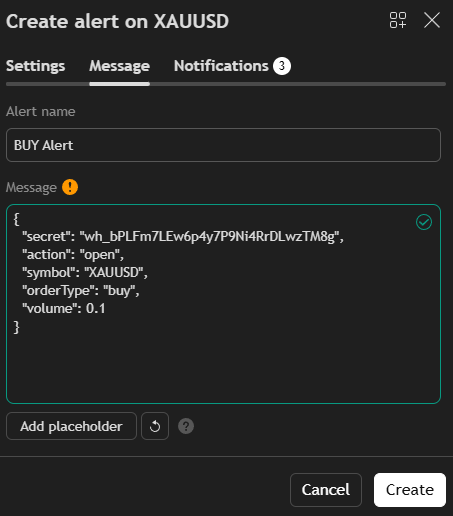
That’s all! Click Create to save the alert and make sure it is active in TradingView.
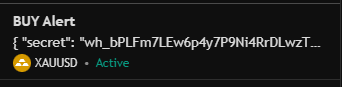
Once the alert is triggered, MetaCopier will receive the notification and the defined order will be executed on your trading account.
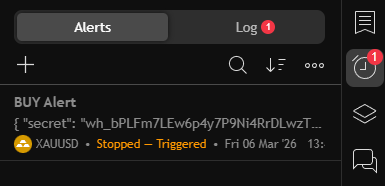
In the Log section in TradingView, you can check the delivery status.
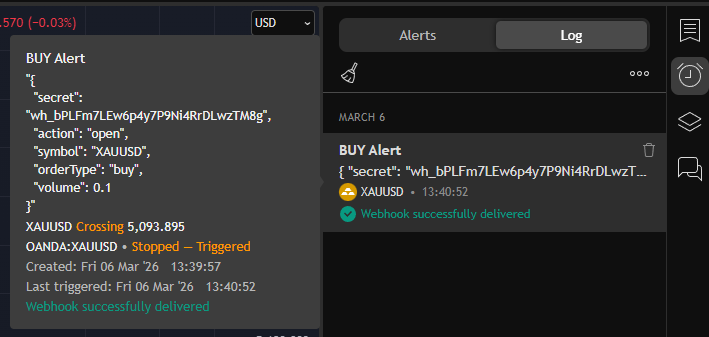
And this is how it looks on the trading account after the webhook has been received.

Webhook examples
Below are some typical JSON messages to help you set up your alerts correctly. As a starting point, we will use the example shown earlier:
{
  "secret": "your_secret_minimum_16_chars",
  "action": "open",
  "symbol": "XAUUSD",
  "orderType": "buy",
  "volume": 0.1
}
To avoid specifying the symbol every time (for example, if you want to reuse the same format on multiple alerts or charts), you can use TradingView placeholders. These placeholders act like variables that TradingView automatically fills with the correct values when the alert is triggered, so you don’t need to hardcode them.
Let’s use the {{ticker}} placeholder to avoid defining the symbol name in every alert:
{
  "secret": "your_secret_minimum_16_chars",
  "action": "open",
  "symbol": "{{ticker}}",
  "orderType": "buy",
  "volume": 0.1
}
When the alert is triggered, the symbol will automatically be replaced based on the chart used to create the alert (in our case, XAUUSD).
Now let’s define take profit (TP) and stop loss (SL) values.
{
  "secret": "your_secret_minimum_16_chars",
  "action": "open",
  "symbol": "{{ticker}}",
  "orderType": "buy",
  "volume": 0.1,
  "stopLoss": 5050,
  "takeProfit": 5130
}
This works, but as you can imagine, the TP/SL values are hardcoded and must be defined each time.
Using Points Instead of Price
By default, stopLoss and takeProfit are interpreted as absolute price levels. You can also specify them as a distance in points from the fill price by adding stopLossType and/or takeProfitType:
{
  "secret": "your_secret_minimum_16_chars",
  "action": "open",
  "symbol": "{{ticker}}",
  "orderType": "buy",
  "volume": 0.1,
  "stopLoss": 500,
  "stopLossType": "points",
  "takeProfit": 1000,
  "takeProfitType": "points"
}
In this example, the SL is set 500 points below the fill price and TP is set 1000 points above (for a buy order). This is useful when you don't know the exact entry price in advance.
How SL/TP reach your broker: separateTpSlOrder
MT4 and MT5 do not support relative (points based) SL/TP at the platform level, so MetaCopier resolves them for you. The optional separateTpSlOrder flag controls how:
separateTpSlOrder: false (default)
SL and TP are always sent together with the order, so the position is never held unprotected.
- With
pricethe levels are used exactly as you send them. - With
pointsMetaCopier fetches the current quote, calculates the levels from it, and sends them with the order. Once the real fill price is known, a follow up modify corrects the levels so the distance matches your request exactly even after slippage. - If the levels are invalid (for example inside the broker's minimum stop distance), the broker rejects the whole order and no position is opened. You receive a clear error and the request is retried.
- If no quote is available for the symbol, the position is not opened and the request fails with
QUOTE_MISSING.
separateTpSlOrder: true
The order is sent without SL/TP and the levels are attached afterwards through a separate modify order. This applies to both price and points.
- The position always opens, even when the levels are invalid.
- The modify is not guaranteed to succeed. If the broker rejects it (minimum stop distance, freeze level), the position stays open without SL/TP.
Also note that points means broker points (the smallest price increment of the symbol), not pips. On a 3 digit gold quote one point equals 0.001, so "stopLoss": 400 is only $0.40 away from the entry price, which most brokers reject as too close.
Multiple Take Profits in a Single Alert (native multi-TP)
If your strategy ladders out at several TP levels, you can send them in one webhook call using the takeProfits array. MetaCopier expands the request server-side into one position per TP level - atomically, in order, and without any risk of bursts being dropped by the broker.
{
  "secret": "your_secret_minimum_16_chars",
  "action": "open",
  "symbol": "XAUUSD",
  "orderType": "buy",
  "volume": 0.06,
  "stopLoss": 4455,
  "tradeKey": "xau_long_001",
  "takeProfits": [
    { "takeProfit": 4470 },
    { "takeProfit": 4480 },
    { "takeProfit": 4495 }
  ]
}
In this example MetaCopier opens 3 positions, each with the same SL but a different TP, splitting the parent volume equally (0.02 each). Each leg gets its own unique tradeKey automatically (xau_long_001_t1, xau_long_001_t2, …) so you can later modify or close them individually.
Per-leg sizing. Each entry in takeProfits may override the default equal split:
"takeProfits": [
  { "takeProfit": 4470, "volume": 0.03 },
  { "takeProfit": 4480, "volumePercent": 33.33 },
  { "takeProfit": 4495 }
]
volume- absolute lot size for that leg.volumePercent- percentage of the parent sizing (works withvolume,riskPercent,riskAmount, ormarginPercent). Sum of percents must be ≤ 100.- Omitted - receives an equal share of whatever sizing remains.
Risk-based / margin-based parents. When the parent uses riskPercent / riskAmount / marginPercent and the legs do not override sizing, the sizing is divided equally across legs so the total equals what you requested.
Per-leg type. A leg may set its own takeProfitType (price or points); otherwise it inherits from the parent.
Constraints.
- Maximum 20 take profit levels per request.
- When using
takeProfits, the parenttradeKeymust be ≤ 16 characters (MetaCopier appends_t<index>to derive unique per-leg keys within the 20-char limit). - The HTTP response stays backward compatible: the top-level
requestIdis the first leg's id, anddata.subRequestIdslists every leg id for per-leg status tracking viaGET /requests/{requestId}/status.
Why use this instead of sending multiple webhooks? A single request avoids the race between concurrent webhook calls hitting the broker. Each leg is reserved with a unique tradeKey and submitted through the same queue, so partial drops under bursts no longer happen.
To make them dynamic, you have two options:
- Use the MetaCopier TP/SL Management feature to set TP/SL values automatically after the order has been placed on the broker.
- Use Pine Script in TradingView to calculate these values dynamically and include them in the webhook message.
Let’s now see how to manage existing trades. To be able to modify or close existing trades via webhook, we first need to define a unique identifier when opening a position. This is done using the JSON property tradeKey. For example:
{
  "secret": "your_secret_minimum_16_chars",
  "action": "open",
  "symbol": "{{ticker}}",
  "orderType": "buy",
  "volume": 0.1,
  "stopLoss": 5050,
  "takeProfit": 5130,
  "tradeKey": "xauusd_long_001"
}
To modify a specific position, you can create an alert with the following content:
{
  "secret": "your_secret_minimum_16_chars",
  "action": "modify",
  "tradeKey": "xauusd_long_001",
  "stopLoss": 5060,
}
And to close it, you can use:
{
  "secret": "your_secret_minimum_16_chars",
  "action": "close",
  "tradeKey": "xauusd_long_001"
}
Webhook URL
MetaCopier operates in four regions: New York, London, Berlin, and Singapore. Each region has its own trading API to help minimize latency and improve execution speed.
In the Setup Guide described above, the correct Webhook URL is automatically generated for your trading account and region.
The Webhook URL has the following structure:
https://{region}.metacopier.io/rest/api/v1/webhooks/tradingview/accounts/{your-account-id}
| Region | Host |
|---|---|
| New York | api-newyork |
| London | api-london |
| Berlin | api-berlin |
| Singapore | api-singapore |
| Global | api |
Advanced Guide
This section covers all features, configuration options, and advanced usage.
Feature Configuration
All configuration options for the TradingView Webhook feature:
{
  "enableWebhook": true,
  "authMethod": "SECRET",
  "webhookSecret": "wh_abc123def456xyz789",
  "allowedActions": ["open", "close", "modify"],
  "allowCloseAll": false,
  "allowSymbolOnlyClose": false,
  "maxMatchCount": 3,
  "ipAllowlist": [],
  "requireTimestampForSecret": false,
  "timestampToleranceSeconds": 60,
  "dataRetentionDays": 30,
  "maxAllowedVolume": 0,
  "openRetry": true,
  "openRetryTimeoutInMinutes": 5
}
Configuration Reference
| Option | Type | Default | Description |
|---|---|---|---|
enableWebhook | boolean | true | Enable/disable webhook processing |
authMethod | string | SECRET | SECRET or HMAC |
webhookSecret | string | - | Secret for SECRET auth (min 16, max 64 chars) |
hmacSecret | string | auto | Secret for HMAC auth (auto-generated, read-only) |
allowedActions | array | all | Allowed actions. Empty = all allowed |
allowCloseAll | boolean | false | Enable closeAll action |
allowSymbolOnlyClose | boolean | false | Allow close by symbol without filters |
maxMatchCount | integer | 3 | Max positions before requiring force: true (1-100) |
ipAllowlist | array | [] | Allowed IPs. Empty = all allowed |
requireTimestampForSecret | boolean | false | Require timestamp for SECRET auth |
timestampToleranceSeconds | integer | 60 | Max age of timestamp in seconds (10-300) |
dataRetentionDays | integer | 30 | TTL for stored data (1-90 days) |
maxAllowedVolume | number | 0 | Max volume in lots per trade (safety cap). Applies to all sizing modes (volume, riskPercent, riskAmount, marginPercent). If the broker's minimum lot size of the symbol is above this value, the trade is skipped. 0 = deactivated (no cap) |
openRetry | boolean | true | Retry a request that was rejected by the broker, left unanswered by the terminal, or could not be sent because the account was temporarily offline. false = send once |
openRetryTimeoutInMinutes | integer | 5 | Total retry window in minutes (1-60). Retries run every 30 seconds. Only used if openRetry is true |
Retry Behaviour
A webhook request is not always answered immediately by the broker. The trading terminal waits up to 15 seconds for a confirmation. If nothing arrives within that time, or if the broker rejects the order (for example because the market is momentarily closed or the price moved away), MetaCopier can retry the request automatically.
A retry is also triggered when the request never reached the broker at all, for example because the account had just lost its broker connection, or because the connection was restored but the symbol list was still loading.
- Retries run every 30 seconds until
openRetryTimeoutInMinuteshas elapsed. - Every failed attempt writes an entry in the account logs, so a trade that is still being retried is visible immediately instead of only after the window has elapsed.
- Retries that follow a missing broker confirmation reuse the same internal request ID. MetaCopier resends the order only when it can determine that the previous attempt never opened a position, so a trade that did reach the broker is never opened twice.
- Once the window has elapsed, the request is marked as failed and a warning entry appears in the account logs.
- With
openRetry: falsethe request is sent exactly once. This is the recommended setting for scalping and high-frequency strategies, where a fill two minutes late is worse than no fill at all.
The webhook response (202 Accepted) is returned immediately when the alert arrives.
Retries happen asynchronously in the background, so TradingView never has to wait.
Authentication Methods
SECRET Authentication (Recommended)
Simple secret in the request body:
{
  "secret": "wh_abc123def456xyz789",
  "action": "open",
  ...
}
Optional Replay Protection
Enable requireTimestampForSecret: true to require timestamp:
{
  "secret": "wh_abc123def456xyz789",
  "timestamp": 1708771200,
  "action": "open",
  ...
}
Requests with timestamps older than timestampToleranceSeconds are rejected.
HMAC Authentication (Advanced)
For enhanced security using cryptographic signatures:
{
  "signature": "a1b2c3d4e5f6...",
  "timestamp": 1708771200,
  "action": "open",
  ...
}
Signature Calculation:
HMAC-SHA256(hmacSecret, timestamp + "." + canonicalPayload)
Where:
timestamp= Unix seconds (required, must be numeric)canonicalPayload= JSON with sorted keys, no whitespace, excludingtimestampandsignaturefields
Note: HMAC auth requires a proxy service to compute the signature before sending to MetaCopier.
All Actions
| Action | Description |
|---|---|
open | Open a new position |
close | Close position(s) by matching criteria |
cancelOrder | Cancel pending order(s) ONLY (never touches live positions) |
modify | Update SL/TP or partial close |
closeAll | Close all positions (requires allowCloseAll: true) |
store | Store custom data in Database |
Open Action
Opens a new position.
{
  "secret": "your_secret",
  "action": "open",
  "symbol": "EURUSD",
  "orderType": "buy",
  "volume": 0.1,
  "stopLoss": 1.0800,
  "stopLossType": "price",
  "takeProfit": 1.0950,
  "takeProfitType": "price",
  "openPrice": 1.0870,
  "tradeKey": "my_trade",
  "magicNumber": "150001",
  "orderId": "Long Entry",
  "comment": "TV_Signal"
}
Open Fields
| Field | Required | Type | Description |
|---|---|---|---|
symbol | ✅ | string | Trading pair (e.g., EURUSD) |
orderType | ✅ | string | Order type (see below) |
volume | ⚡ | number | Lot size (must be positive). Required unless riskPercent, riskAmount, or marginPercent is used |
riskPercent | ⚡ | number | Risk as percentage of account balance (e.g., 1.0 = 1%). Requires stopLoss. See Risk Per Trade Sizing |
riskAmount | ⚡ | number | Risk as fixed currency amount (e.g., 100 = $100). Requires stopLoss. See Risk Per Trade Sizing |
marginPercent | ⚡ | number | Size the position to use a percentage of your free (available) margin (e.g., 5.0 = 5%). Does not require a stop loss. See Margin-Based Sizing |
stopLoss | ⬜ | number | Stop loss value (interpretation depends on stopLossType) |
stopLossType | ⬜ | string | price (default) for absolute price, points for relative distance from fill price |
takeProfit | ⬜ | number | Take profit value (interpretation depends on takeProfitType) |
takeProfitType | ⬜ | string | price (default) for absolute price, points for relative distance from fill price |
separateTpSlOrder | ⬜ | boolean | false (default): SL/TP are sent together with the order. true: the order is opened first and SL/TP are attached through a separate modify order, which the broker may reject. See the note in the Points section |
takeProfits | ⬜ | array | Optional list of TP levels for native multi-TP. When provided, MetaCopier opens one position per level atomically. See Multi Take Profit |
openPrice | ⬜ | number | Entry price (for pending orders) |
pendingExpirySeconds | ⬜ | number | Expiry (seconds from now) for pending orders (buyLimit/sellLimit/buyStop/sellStop). On MT4/MT5 the broker cancels the order automatically if it is not filled in time, 0/omitted = good-till-cancelled. On accounts without native pending orders (virtual pending orders) 0/omitted = 24 hours, at most 7 days. Ignored for market orders. See Pending Order Expiry |
tradeKey | ⬜ | string | Unique identifier for this trade (max 20 chars, no ` |
magicNumber | ⬜ | string | Group identifier for the strategy. Digits only, positive integer (e.g. "150001"). Written to the broker's native magic number field, so it is never truncated. See Truncation-Proof Grouping |
orderId | ⬜ | string | Strategy order ID from {{strategy.order.id}} (no ` |
comment | ⬜ | string | Trade comment (no ` |
Comment Truncation: MetaCopier prepends a short tracking prefix to the comment field (format: TV|tradeKey|orderId|comment). Since MT4/MT5 brokers typically limit the comment field to 25–31 characters, everything beyond the limit is cut off by the broker. The identifiers sit at the end of the string, so orderId is the first part to disappear. A truncated orderId no longer matches, which silently breaks matchMode: GROUP for close, cancelOrder and modify.
To stay within the limit, use short tradeKey values and omit orderId. For group operations that must always work, use magicNumber instead (see below).
Seeing truncated comments? Write to support@metacopier.io with your account and an affected ticket number. We can enable server-side comment restoration for your account. MetaCopier then remembers the comment it sent and returns the full text through the REST API, even though the broker itself only stores the shortened version. Note that the MetaTrader terminal still displays the shortened comment, which is a broker limit we cannot change.
Pipe character restriction: The tradeKey, orderId, and comment fields must not contain the pipe character (|). This character is used internally as a delimiter for position tracking. Requests containing | in these fields will be rejected with a 400 error.
Truncation-Proof Grouping (magicNumber)
magicNumber is not part of the comment. It is written to the broker's own magic number field (ExpertId on MT4/MT5, label on cTrader), a separate numeric field with no character limit that is read back unchanged. Group matching on magicNumber compares that exact value, so it cannot be affected by comment truncation.
orderId is only carried inside the comment and is matched as a substring of it. On brokers with a short comment field it will not survive.
magicNumber | orderId | |
|---|---|---|
| Stored in | Native broker field | Position comment |
| Truncation risk | None | High (25–31 char limit) |
| Matched by | Exact value | Substring of the comment |
| Recommended for GROUP | ✅ Yes | ⚠️ Fallback only |
Recommendation: if you rely on matchMode: GROUP for close, cancelOrder or modify, map your strategy or entry name to a fixed integer and send it as magicNumber.
{
  "secret": "your_secret_minimum_16_chars",
  "action": "open",
  "symbol": "EURUSD",
  "orderType": "buy",
  "volume": 0.1,
  "magicNumber": "150001"
}
{
  "secret": "your_secret_minimum_16_chars",
  "action": "close",
  "matchMode": "GROUP",
  "magicNumber": "150001",
  "force": true
}
magicNumber must be digits only. The value is passed straight through to the broker's numeric magic number field, so anything containing letters, underscores or spaces (e.g. "RSI_15M") is rejected and the position is not opened. The account log shows MAGIC_NUMBER_ONLY_DIGITS_ALLOWED; negative values are rejected with MAGIC_NUMBER_MUST_BE_POSITIVE.
Pick any positive integer as your strategy ID and keep the mapping on your side, for example 150001 = RSI 15M, 220001 = Grid EURUSD.
Magic numbers are also visible to copier filters, so choose values that do not collide with other strategies on the same account. On DXtrade, TradeLocker, MatchTrader and the crypto exchanges the magic number field is not available. Use tradeKey (EXACT) there.
Order Types
| Type | Description |
|---|---|
buy | Market buy |
sell | Market sell |
buylimit | Buy limit order |
selllimit | Sell limit order |
buystop | Buy stop order |
sellstop | Sell stop order |
Order types are case-insensitive.
Risk Per Trade Sizing
Instead of specifying a fixed volume, you can let MetaCopier automatically calculate the lot size based on your risk tolerance and the stop loss distance. Two modes are available:
riskPercent- risk a percentage of your account balance per traderiskAmount- risk a fixed currency amount per trade
How It Works
When you send riskPercent or riskAmount instead of volume, MetaCopier calculates the lot size using these formulas:
Percentage mode:
lots = (balance × riskPercent / 100) / (stopLossDistance × tickValue)
Amount mode:
lots = riskAmount / (stopLossDistance × tickValue)
The result is then rounded to the symbol's lot step and clamped to the symbol's min/max volume.
Volume cap applies here too. If you set maxAllowedVolume (see Configuration Reference) to a value greater than 0, the calculated lot size is capped to it after the risk calculation. Set it to 0 to deactivate the cap.
Requirements
To use riskPercent or riskAmount, the following features must be enabled on your trading account in MetaCopier:
- TradingView Webhook feature
- Risk Per Trade feature (provides tick value configuration and symbol settings)
The Risk Per Trade feature is needed for the tick value used in the lot size calculation. Tick values are collected automatically from your trades once both features are active.
You do not need to set a risk percentage or absolute risk amount in the Risk Per Trade feature settings. Both values can be left at 0 - this disables the account-level risk limiting, but the tick value service still runs in the background. The webhook uses its own riskPercent or riskAmount parameter for lot size calculation, and only needs the tick value data from the Risk Per Trade feature.
Tick value can also be entered manually. On the account-level Risk Per Trade feature you can either keep Tick value automatic adjustement enabled (the default, detects the tick value from live and history trades) or disable it and type the Tick value in directly, globally or per symbol. Use manual entry if you want to trade immediately without waiting for auto-detection, or when auto-detection is unreliable (very small or very few trades). See Risk Per Trade - Tick Value for how to calculate it.
Important: When automatic detection is used, the tick value service needs data from at least one closed or open trade before it can calculate lot sizes. The trades must have some pips of profit or loss (not zero) so the system can detect the tick value in your account currency. If no tick value data is available yet and no manual tick value is configured, the webhook will return a RISK_TICK_VALUE_UNAVAILABLE error.
Rules
volume,riskPercent,riskAmount, andmarginPercentare mutually exclusive - provide exactly oneriskPercentmust be greater than0and at most100riskAmountmust be greater than0stopLossis mandatory when usingriskPercentorriskAmount(the SL distance determines the lot size). It is not required formarginPercent- Works with both
stopLossType: "price"andstopLossType: "points" - Works with all order types (market and pending)
Example: Risk 1% of Balance
{
  "secret": "your_secret_minimum_16_chars",
  "action": "open",
  "symbol": "EURUSD",
  "orderType": "buy",
  "riskPercent": 1.0,
  "stopLoss": 50,
  "stopLossType": "points",
  "takeProfit": 100,
  "takeProfitType": "points"
}
If your account balance is $10,000, this risks $100 (1%). With a 50-point SL and the current tick value, MetaCopier calculates the appropriate lot size automatically.
Example: Risk 2% with Price-Based SL
{
  "secret": "your_secret_minimum_16_chars",
  "action": "open",
  "symbol": "XAUUSD",
  "orderType": "buy",
  "riskPercent": 2.0,
  "stopLoss": 2300.00,
  "takeProfit": 2380.00,
  "tradeKey": "gold_long_001"
}
Example: Risk $100 Fixed Amount
{
  "secret": "your_secret_minimum_16_chars",
  "action": "open",
  "symbol": "EURUSD",
  "orderType": "buy",
  "riskAmount": 100,
  "stopLoss": 50,
  "stopLossType": "points",
  "takeProfit": 100,
  "takeProfitType": "points"
}
This risks exactly $100 regardless of your account balance. With a 50-point SL and the current tick value, MetaCopier calculates the appropriate lot size automatically.
Pine Script Example with Risk Per Trade
//@version=5
strategy("Risk Managed Strategy", overlay=true)

slPoints = input.int(50, "SL Points")
tpPoints = input.int(100, "TP Points")
riskPct  = input.float(1.0, "Risk %", minval=0.1, maxval=100)

if buyCondition
    alertMsg = '{"secret": "your_secret_minimum_16_chars", "action": "open", "symbol": "' + syminfo.ticker + '", "orderType": "buy", "riskPercent": ' + str.tostring(riskPct) + ', "stopLoss": ' + str.tostring(slPoints) + ', "stopLossType": "points", "takeProfit": ' + str.tostring(tpPoints) + ', "takeProfitType": "points", "tradeKey": "risk_' + syminfo.ticker + '_' + str.tostring(timenow) + '"}'
    strategy.entry("Long", strategy.long, alert_message=alertMsg)
Margin-Based Sizing
Instead of sizing from a stop-loss distance, you can size the position from your free (available) margin using marginPercent. This is useful when your strategy has no fixed stop loss, or when you want each trade to consume a predictable slice of your buying power.
How It Works
When you send marginPercent instead of volume, MetaCopier calculates the lot size using:
lots = (freeMargin × marginPercent / 100) / marginPerLot
marginPerLot is the margin required for 1.0 lot, taken directly from the broker (MT4 MODE_MARGINREQUIRED / MT5 OrderCalcMargin) when available, otherwise derived from the current price, contract size, and the symbol's effective leverage. The result is rounded to the symbol's lot step and clamped to its min/max volume.
Self-limiting. Because sizing is based on free margin, each new open position reduces the margin available to the next one, so trades are automatically sized smaller as your exposure grows - reducing the chance of a margin call.
No stop loss and no Risk Per Trade feature required. Unlike riskPercent / riskAmount, margin-based sizing does not use the stop-loss distance or the tick value, so the Risk Per Trade feature is not needed.
Rules
marginPercentis mutually exclusive withvolume,riskPercent, andriskAmount- provide exactly onemarginPercentmust be greater than0and at most100- No
stopLossis required - Works with all order types (market and pending)
- The
maxAllowedVolumecap (if set) still applies after the calculation
Not available where margin is unknown. Some account types (e.g. certain crypto/CEX accounts) do not report free margin. On those accounts a marginPercent request is rejected with a MARGIN_UNAVAILABLE reason.
Example: Use 5% of Free Margin
{
  "secret": "your_secret_minimum_16_chars",
  "action": "open",
  "symbol": "EURUSD",
  "orderType": "buy",
  "marginPercent": 5.0,
  "takeProfit": 1.0950,
  "tradeKey": "eur_margin_01"
}
If your free margin is $10,000 and 1.0 lot of EURUSD requires $500 of margin, this opens (10000 × 5 / 100) / 500 = 1.0 lot.
Multi Take Profit
Instead of sending several webhook calls when your strategy ladders out at multiple TP levels, you can declare every level in a single open request using the takeProfits array. MetaCopier expands the request server-side into one position per TP level, atomically and in order, so bursts cannot be partially dropped by the broker.
{
  "secret": "your_secret_minimum_16_chars",
  "action": "open",
  "symbol": "XAUUSD",
  "orderType": "buy",
  "volume": 0.06,
  "stopLoss": 4455,
  "tradeKey": "xau_long_001",
  "takeProfits": [
    { "takeProfit": 4470 },
    { "takeProfit": 4480 },
    { "takeProfit": 4495 }
  ]
}
In this example MetaCopier opens 3 positions, each sharing the same SL but with a different TP, splitting the parent volume equally (0.02 each). Each leg receives its own unique tradeKey derived from the parent (xau_long_001_t1, xau_long_001_t2, …), so legs can later be modified or closed individually.
Level Fields
Each entry in takeProfits accepts the following fields:
| Field | Required | Type | Description |
|---|---|---|---|
takeProfit | ✅ | number | TP value for this leg (price or points depending on takeProfitType) |
takeProfitType | ⬜ | string | price (default) or points. If omitted, inherits the parent request's takeProfitType |
volume | ⬜ | number | Absolute lot size for this leg. Mutually exclusive with volumePercent |
volumePercent | ⬜ | number | Percentage (0-100) of the parent sizing to allocate to this leg. Mutually exclusive with volume. Works with parent volume, riskPercent, riskAmount, and marginPercent |
If a leg sets neither volume nor volumePercent, it receives an equal share of whatever sizing remains after the explicit allocations.
Per-Leg Sizing Example
"takeProfits": [
  { "takeProfit": 4470, "volume": 0.03 },
  { "takeProfit": 4480, "volumePercent": 33.33 },
  { "takeProfit": 4495 }
]
The first leg takes a fixed 0.03 lots, the second takes 33.33% of the parent sizing, and the third receives the remainder.
Risk-Based / Margin-Based Parents
When the parent uses riskPercent, riskAmount, or marginPercent and the legs do not override sizing, the sizing is divided equally across legs so the total equals what you requested. Per-leg volumePercent can still be used to weight legs differently.
{
  "secret": "your_secret_minimum_16_chars",
  "action": "open",
  "symbol": "EURUSD",
  "orderType": "buy",
  "riskPercent": 1.0,
  "stopLoss": 1.0800,
  "tradeKey": "eur_risk_01",
  "takeProfits": [
    { "takeProfit": 1.0850 },
    { "takeProfit": 1.0900 },
    { "takeProfit": 1.0950 }
  ]
}
Constraints
| Constraint | Limit |
|---|---|
| Maximum levels per request | 20 |
Parent tradeKey length | ≤ 16 chars when takeProfits is used (server appends _t<index> to derive unique per-leg keys within 20 chars) |
Sum of volumePercent across legs | ≤ 100 |
Per-leg takeProfit | Required on every entry |
volume vs volumePercent | Mutually exclusive per leg |
Response Shape
The HTTP response stays backward compatible:
- The top-level
requestIdis the first leg's request id. data.subRequestIdslists every leg id in order.data.legCountis the total number of legs created.
Use the leg ids with GET /requests/{requestId}/status to track per-leg delivery and execution.
Managing Legs After Open
Each leg behaves like a normal position once opened. To modify or close a specific leg, use its derived tradeKey:
{
  "secret": "your_secret_minimum_16_chars",
  "action": "modify",
  "tradeKey": "xau_long_001_t2",
  "stopLoss": 4460
}
To act on all legs at once, group them with a shared magicNumber on the parent request and use matchMode: GROUP:
{
  "secret": "your_secret_minimum_16_chars",
  "action": "open",
  "symbol": "XAUUSD",
  "orderType": "buy",
  "volume": 0.06,
  "stopLoss": 4455,
  "tradeKey": "xau_long_001",
  "magicNumber": "770001",
  "takeProfits": [
    { "takeProfit": 4470 },
    { "takeProfit": 4480 },
    { "takeProfit": 4495 }
  ]
}
{
  "secret": "your_secret_minimum_16_chars",
  "action": "close",
  "matchMode": "GROUP",
  "magicNumber": "770001",
  "force": true
}
Why use this instead of sending multiple webhooks? A single request avoids the race between concurrent webhook calls hitting the broker. Each leg is reserved with a unique tradeKey and submitted through the same queue, so partial drops under bursts no longer happen.
Close Action
Closes position(s) based on matching criteria.
Match Modes
| Mode | Matches By | Description |
|---|---|---|
EXACT | tradeKey | Close specific position(s) from stored mapping |
GROUP | magicNumber or orderId | Close positions by strategy group |
BULK | symbol | Close all positions for a symbol |
If matchMode is not provided, it's auto-detected based on which fields you include.
An explicit matchMode overrides auto-detection and the other identifiers are ignored. If you send "matchMode": "GROUP" together with a tradeKey, the tradeKey is not used at all and only magicNumber / orderId decide which positions match. If nothing matches you get POSITION_NOT_FOUND, even though the tradeKey exists.
To match a single position by its tradeKey, either omit matchMode entirely or set it to "EXACT".
Close by TradeKey (EXACT)
{
  "secret": "your_secret",
  "action": "close",
  "tradeKey": "my_trade_001"
}
Close by Magic Number (GROUP)
{
  "secret": "your_secret",
  "action": "close",
  "matchMode": "GROUP",
  "magicNumber": "150001",
  "closeMode": "all"
}
Close by Symbol (BULK)
{
  "secret": "your_secret",
  "action": "close",
  "matchMode": "BULK",
  "symbol": "EURUSD",
  "direction": "long",
  "closeMode": "first"
}
Close Fields
| Field | Type | Description |
|---|---|---|
matchMode | string | EXACT, GROUP, or BULK (auto-detected if omitted). An explicit value overrides auto-detection |
tradeKey | string | Position identifier (EXACT mode). Ignored if matchMode is GROUP or BULK |
magicNumber | string | Strategy identifier, digits only (GROUP mode). Reliable: never truncated |
orderId | string | Strategy order ID (GROUP mode). Matched inside the comment, so it can be lost to comment truncation |
symbol | string | Trading pair (BULK mode) |
direction | string | long or short filter (BULK mode) |
closeMode | string | first, last, or all (default: all) |
force | boolean | Allow closing more than maxMatchCount positions |
Close Modes
| Value | Description |
|---|---|
first | Close oldest position (FIFO) |
last | Close newest position (LIFO) |
all | Close all matching positions |
Force Flag
If more than maxMatchCount positions match, you must either:
- Add
force: truewith explicitmatchMode - Add more specific filters
This prevents accidental bulk operations.
Cancel Order Action
Cancels pending order(s) only (unfilled Limit/Stop orders). Live (already filled) positions are never affected. Uses the exact same matching options as close (tradeKey / magicNumber / orderId / symbol + direction / closeMode / matchMode).
Why this exists. If you manage pending-order expiry with your own timer and send close when it fires, a close would also close the position if the order was already filled in the meantime. cancelOrder removes that risk: it only ever cancels pending orders. If the order already filled (or no longer exists), the request is a safe no-op (success, nothing cancelled) rather than an error.
Cancel by TradeKey (EXACT):
{
  "secret": "your_secret",
  "action": "cancelOrder",
  "tradeKey": "my_trade_001"
}
Cancel a pending order for a symbol (BULK):
{
  "secret": "your_secret",
  "action": "cancelOrder",
  "matchMode": "BULK",
  "symbol": "EURUSD",
  "direction": "long"
}
cancelOrder is a distinct action string. If you restrict allowedActions, add "cancelOrder" to the list (leaving allowedActions empty allows all actions).
Native alternative: For MT4/MT5 you can skip the external timer entirely by setting pendingExpirySeconds on the open payload. See Pending Order Expiry.
Pending Order Expiry
Set pendingExpirySeconds on an open request to give a pending order (buyLimit, sellLimit, buyStop, sellStop) a native broker-side expiry. The broker cancels the order automatically if it has not been filled within that time. No follow-up webhook is needed.
{
  "secret": "your_secret",
  "action": "open",
  "symbol": "EURUSD",
  "orderType": "buyLimit",
  "volume": 0.1,
  "openPrice": 1.0800,
  "pendingExpirySeconds": 3600
}
- Only applies to pending orders on MT4/MT5. It is ignored for market orders (
buy/sell) and for account types that do not support broker-native expiry. 0or omitted means good-till-cancelled (no expiry).- Enforcement is broker-dependent: some brokers require a minimum expiry (often at least a few minutes) or do not allow pending order expiry at all. If the broker rejects the expiry, the order is placed without one.
- Because the broker owns the timer, expiry works even if it fires long after the alert; there is no race with a fill (a filled order simply stays open).
- Prefer this over an external timer +
cancelOrderwhen your account is MT4/MT5. UsecancelOrderfor manual/early cancellation or on connectors without native expiry.
Accounts without native pending orders
On account types without native pending orders (e.g. crypto exchanges, TradeLocker, MatchTrader, Tradovate), a pending order from the webhook becomes a virtual pending order: MetaCopier holds it, checks the price every few seconds and sends a market order once the entry price is reached. pendingExpirySeconds is the validity of the virtual order; 0 or omitted means 24 hours, the maximum is 7 days. close and cancelOrder cancel a virtual pending order like any other pending order. A modify can change entry price, stop loss and take profit; reduceVolumeBy is not possible because the volume is calculated when the order triggers. An openPrice is required (0 or omitted is rejected), and like on MT4/MT5 an order whose entry is already reached (e.g. a buy stop below the current price) is rejected as an invalid price. DXTrade delivers no prices, so pending orders are not possible there. See Pending orders on accounts without pending-order support.
Modify Action
Modifies existing position(s). Supports EXACT (tradeKey), GROUP (magicNumber / orderId), and BULK (symbol) matching - same modes as the close action.
Modify a single position by tradeKey (EXACT):
{
  "secret": "your_secret",
  "action": "modify",
  "tradeKey": "my_trade_001",
  "stopLoss": 1.0850,
  "takeProfit": 1.0980
}
Modify all positions sharing a magicNumber (GROUP):
{
  "secret": "your_secret",
  "action": "modify",
  "matchMode": "GROUP",
  "magicNumber": "150001",
  "stopLoss": 1.0820,
  "takeProfit": 1.0960
}
Modify all positions sharing a strategy orderId (GROUP):
{
  "secret": "your_secret",
  "action": "modify",
  "matchMode": "GROUP",
  "orderId": "Long Entry",
  "stopLoss": 1.0820
}
Modify all open positions on a symbol (BULK):
{
  "secret": "your_secret",
  "action": "modify",
  "matchMode": "BULK",
  "symbol": "EURUSD",
  "stopLoss": 1.0820
}
If a modify request matches more than maxMatchCount positions, the request is rejected with AMBIGUOUS_MATCH. Add force: true together with an explicit matchMode to proceed. This safety guard mirrors the close action.
Partial Close
{
  "secret": "your_secret",
  "action": "modify",
  "tradeKey": "my_trade_001",
  "reduceVolumeBy": 0.05
}
If reduceVolumeBy reduces the position to 0 or below, the position is fully closed.
reduceVolumeBy is only supported in EXACT mode (matching by tradeKey). It is rejected in GROUP and BULK modes because "reduce by X" is ambiguous across multiple positions (per-position vs. total group exposure). To reduce volume for several positions, send one modify per tradeKey.
Modify Fields
| Field | Type | Description |
|---|---|---|
matchMode | string | EXACT, GROUP, or BULK (auto-detected). An explicit value overrides auto-detection |
tradeKey | string | Position identifier (EXACT mode). Ignored if matchMode is GROUP or BULK |
magicNumber | string | Strategy identifier, digits only (GROUP mode). Reliable: never truncated |
orderId | string | Strategy order ID (GROUP mode). Matched inside the comment, so it can be lost to comment truncation |
symbol | string | Trading pair (BULK mode) |
force | boolean | Allow modifying more than maxMatchCount positions |
stopLoss | number | New stop loss price (absolute price only, not points) |
takeProfit | number | New take profit price (absolute price only, not points) |
openPrice | number | New price for pending orders |
reduceVolumeBy | number | Volume to reduce (partial close) |
CloseAll Action
Closes ALL positions on the account.
{
  "secret": "your_secret",
  "action": "closeAll",
  "force": true
}
Requirements:
- Feature must have
allowCloseAll: true - Request must have
force: true
This closes every open position on the account!
Store Action
Stores custom data from TradingView strategies/indicators.
{
  "secret": "your_secret",
  "action": "store",
  "data": {
    "symbol": "EURUSD",
    "rsi": 72.5,
    "macd": 0.0012,
    "signal": "overbought"
  }
}
| Field | Required | Type | Description |
|---|---|---|---|
data | ✅ | object | Any JSON object to store (max 100KB size) |
Data is stored in Database with TTL based on dataRetentionDays.
The data object has a maximum size limit of 100KB. Requests exceeding this limit will be rejected.
Retrieve Stored Data
Use the REST API to fetch stored data:
List all stored data (paginated):
GET /rest/api/v1/webhooks/tradingview/accounts/{accountId}/data?limit=50&skip=0
Response:
{
  "data": [
    {
      "id": "65abc123...",
      "accountId": "your-account-id",
      "data": { "symbol": "EURUSD", "rsi": 72.5 },
      "receivedAt": "2024-02-24T12:00:00Z"
    }
  ],
  "count": 1,
  "total": 15,
  "limit": 50,
  "skip": 0
}
Get specific data by ID:
GET /rest/api/v1/webhooks/tradingview/accounts/{accountId}/data/{dataId}
Delete specific data:
DELETE /rest/api/v1/webhooks/tradingview/accounts/{accountId}/data/{dataId}
These endpoints require API authentication (not the webhook secret). See REST API documentation for details.
Common Request Fields
Fields available on all actions:
| Field | Type | Description |
|---|---|---|
action | string | Action type (required) |
secret | string | Webhook secret (for SECRET auth) |
signature | string | HMAC signature (for HMAC auth) |
timestamp | number/string | Unix seconds or ISO-8601 string |
idempotencyKey | string | Prevents duplicate execution |
schemaVersion | integer | Schema version (only 1 supported) |
Idempotency
Include an idempotencyKey to prevent duplicate executions:
{
  "secret": "your_secret",
  "idempotencyKey": "open:EURUSD:1708771200000",
  "action": "open",
  ...
}
Same key within 5 minutes returns the cached response.
Timestamp Format
Timestamp accepts:
- Number: Unix seconds (e.g.,
1708771200) - String: ISO-8601 (e.g.,
"2024-02-24T12:00:00Z")
Error Codes
Authentication Errors (401)
| Code | Description |
|---|---|
INVALID_SECRET | Webhook secret doesn't match |
INVALID_SIGNATURE | HMAC signature verification failed |
TIMESTAMP_EXPIRED | Timestamp outside valid window |
TIMESTAMP_MISSING | Timestamp required but not provided |
Authorization Errors (403)
| Code | Description |
|---|---|
WEBHOOK_NOT_ENABLED | Feature not enabled on account |
IP_NOT_ALLOWED | Request IP not in allowlist |
ACTION_NOT_ALLOWED | Action not in allowed actions list |
CLOSE_ALL_NOT_ALLOWED | closeAll requires allowCloseAll: true |
SYMBOL_ONLY_NOT_ALLOWED | Symbol-only close requires additional filter |
PROFIT_TARGET_HIT | Order skipped - a profit target is hit |
RISK_LIMIT_HIT | Order skipped - a risk limit is hit |
PROFIT_TARGET_AND_RISK_LIMIT_HIT | Order skipped - both profit target and risk limit are hit |
Validation Errors (400)
| Code | Description |
|---|---|
INVALID_ACTION | Unknown or missing action |
INVALID_JSON | JSON parsing failed |
INVALID_CONTENT_TYPE | Must be application/json |
INVALID_ORDER_TYPE | Unknown order type |
INVALID_MATCH_MODE | Unknown matchMode (must be EXACT/GROUP/BULK) |
MISSING_IDENTIFIER | No position identifier provided |
FORCE_REQUIRES_EXPLICIT_MODE | force:true requires explicit matchMode |
UNSUPPORTED_SCHEMA_VERSION | Only schemaVersion 1 supported |
INVALID_TIMESTAMP_TYPE_FOR_HMAC | HMAC requires numeric timestamp |
INVALID_RISK_PERCENT | riskPercent must be > 0 and ≤ 100 |
INVALID_RISK_AMOUNT | riskAmount must be > 0 |
INVALID_MARGIN_PERCENT | marginPercent must be > 0 and ≤ 100 |
RISK_SIZING_CONFLICT | Only one of volume, riskPercent, riskAmount, or marginPercent can be specified |
RISK_PERCENT_REQUIRES_STOP_LOSS | stopLoss is mandatory when using riskPercent |
RISK_AMOUNT_REQUIRES_STOP_LOSS | stopLoss is mandatory when using riskAmount |
MISSING_SIZING | None of volume, riskPercent, riskAmount, or marginPercent provided |
RISK_PER_TRADE_FEATURE_REQUIRED | Risk Per Trade feature must be added to the account |
RISK_TICK_VALUE_UNAVAILABLE | No tick value data available yet for the symbol |
Not Found Errors (404)
| Code | Description |
|---|---|
TRADEKEY_NOT_FOUND | TradeKey not found in mapping |
POSITION_NOT_FOUND | No positions match criteria |
ACCOUNT_NOT_FOUND | Account ID not found |
Conflict Errors (409)
| Code | Description |
|---|---|
AMBIGUOUS_MATCH | Too many matches - add force:true with explicit matchMode |
Service Errors (503)
| Code | Description |
|---|---|
ACCOUNT_NOT_CONNECTED | Trading account is disconnected |
Internal Errors (500)
| Code | Description |
|---|---|
REQUEST_FAILED | An asynchronous request finished unsuccessfully. The message field carries the reason reported by the terminal, see #execution-reasons-in-the-account-log |
INTERNAL_ERROR | Unexpected server-side error |
IP Allowlist (Optional)
Restrict webhook access to specific IPs:
{
  "ipAllowlist": ["52.89.214.238", "34.212.75.30"]
}
TradingView IPs may change without notice. Empty allowlist (default) allows all IPs.
Troubleshooting
When troubleshooting any webhook issue, check the Logs and Audit Logs sections in MetaCopier. Logs show real-time information about trade execution, errors, and broker rejections. Audit Logs provide a detailed history of all actions and changes, helping you understand the sequence of events that led to an issue.
Alert not working?
- Check your webhook URL is correct
- Verify your JSON is valid (use a JSON validator)
- Confirm your secret matches exactly
- Make sure your account is connected
Position not found?
- Check the
tradeKeyspelling exactly - The position may already be closed
- Use the exact same
tradeKeyyou used when opening
AMBIGUOUS_MATCH error?
- Add
force: truewith explicitmatchMode - Or add more specific filters (symbol, direction)
HMAC signature fails?
- Ensure timestamp is numeric (Unix seconds)
- Ensure canonical payload excludes timestamp/signature
- Ensure keys are sorted alphabetically
Alert accepted (202) but no trade appears?
- The webhook was queued successfully, so the problem is on the broker side. Check the account Logs for the rejection reason.
- If the log shows that no confirmation was received from the terminal, the order is retried automatically as long as
openRetryis enabled. IncreaseopenRetryTimeoutInMinutesif your broker is regularly slow. - If
openRetryis disabled, the request is sent only once and a warning entry is written immediately. - An entry such as
Attempt 2 failed, retrying: ... - buy EURUSD 0.10means the trade is still being retried inside the configured window. No action is needed until the final warning appears. - A message such as
Retry window elapsed after N attempt(s)means every attempt inside the configured window failed. In that case the underlying broker error in the same log entry is the relevant one.
Execution reasons in the account log
These markers are not HTTP error codes. They come from the trading terminal and appear inside the account Logs entries (and in the message field when polling GET /requests/{requestId}/status).
| Marker | Meaning | Retried? |
|---|---|---|
BROKER_REJECTION | No confirmation arrived from the terminal within 15 seconds. This is a timeout, not necessarily a rejection by the broker | Yes |
ACCOUNT_IS_NOT_CONNTECTED | The account was offline when the request reached the terminal, nothing was sent | Yes |
SYMBOLS_NOT_LOADED | The account had just reconnected and the symbol list was still loading | Yes |
REQUEST_IN_PROGRESS | A previous attempt for the same order is still running | Yes |
REQUEST_ALREADY_PROCESSED | The order of a previous attempt did reach the broker, so it is not sent again | No |
ACCOUNT_IS_READ_ONLY | The account is set to read only or has trading disabled | No |
MAX_OPEN_POSITIONS_EXCEEDED | The account's maximum open positions limit was reached | No |
SYMBOL_NOT_FOUND | The symbol does not exist on the broker or is not mapped | No |
Retried markers are only retried when openRetry is enabled and the retry window has not elapsed.
Examples by Use Case
This section provides complete examples for common trading scenarios.
Close All Positions on Account
Close every open position on the account. Useful for emergency exit or end-of-day cleanup.
Step 1: Enable closeAll in Feature Settings
{
  "allowCloseAll": true
}
Step 2: Send closeAll Request
{
  "secret": "your_secret_minimum_16_chars",
  "action": "closeAll",
  "force": true
}
This closes ALL positions immediately. Both allowCloseAll: true and force: true are required as safety guards.
Close by Strategy Group (Magic Number)
Close all positions belonging to a specific strategy. Useful when running multiple strategies on the same account.
Open with Magic Number
{
  "secret": "your_secret_minimum_16_chars",
  "action": "open",
  "symbol": "EURUSD",
  "orderType": "buy",
  "volume": 0.1,
  "magicNumber": "150001"
}
Close All Positions with Same Magic Number
{
  "secret": "your_secret_minimum_16_chars",
  "action": "close",
  "matchMode": "GROUP",
  "magicNumber": "150001"
}
This closes ALL positions with magicNumber: "150001", regardless of symbol or direction.
Close Only Long Positions in Group
{
  "secret": "your_secret_minimum_16_chars",
  "action": "close",
  "matchMode": "GROUP",
  "magicNumber": "150001",
  "direction": "long"
}
Close by Order ID (Pine Script Strategies)
Close positions by strategy entry name. Useful for Pine Script strategies using strategy.entry().
Pine Script Strategy Example
//@version=5
strategy("My Strategy", overlay=true)

if buyCondition
    strategy.entry("Long Entry", strategy.long)

if sellCondition
    strategy.entry("Short Entry", strategy.short)
Alert Message (Open)
{
  "secret": "your_secret_minimum_16_chars",
  "action": "open",
  "symbol": "{{ticker}}",
  "orderType": "{{strategy.order.action}}",
  "volume": 0.1,
  "orderId": "{{strategy.order.id}}"
}
Alert Message (Close All "Long Entry" Positions)
{
  "secret": "your_secret_minimum_16_chars",
  "action": "close",
  "matchMode": "GROUP",
  "orderId": "Long Entry"
}
orderId is NOT unique - all positions with the same entry name are closed.
orderId is matched inside the position comment, which MT4/MT5 brokers truncate to 25–31 characters. Long entry names are cut off and then no longer match. If this recipe returns POSITION_NOT_FOUND, send a numeric magicNumber on open and group by that instead. See Truncation-Proof Grouping.
Close by Symbol (Bulk Matching)
Close positions for a specific symbol. Requires additional filters by default.
Close All EURUSD Long Positions
{
  "secret": "your_secret_minimum_16_chars",
  "action": "close",
  "matchMode": "BULK",
  "symbol": "EURUSD",
  "direction": "long"
}
Close All EURUSD Short Positions
{
  "secret": "your_secret_minimum_16_chars",
  "action": "close",
  "matchMode": "BULK",
  "symbol": "EURUSD",
  "direction": "short"
}
Close ALL EURUSD Positions (Both Directions)
{
  "secret": "your_secret_minimum_16_chars",
  "action": "close",
  "matchMode": "BULK",
  "symbol": "EURUSD",
  "force": true
}
Without direction, this matches all EURUSD positions. If more than maxMatchCount positions exist, force: true is required.
Close First or Last Position (FIFO/LIFO)
Close only the oldest or newest position matching your criteria.
Close Oldest Position (FIFO)
{
  "secret": "your_secret_minimum_16_chars",
  "action": "close",
  "matchMode": "BULK",
  "symbol": "EURUSD",
  "direction": "long",
  "closeMode": "first"
}
Close Newest Position (LIFO)
{
  "secret": "your_secret_minimum_16_chars",
  "action": "close",
  "matchMode": "BULK",
  "symbol": "EURUSD",
  "direction": "long",
  "closeMode": "last"
}
Close Oldest Position in Strategy Group
{
  "secret": "your_secret_minimum_16_chars",
  "action": "close",
  "matchMode": "GROUP",
  "magicNumber": "220001",
  "closeMode": "first"
}
Partial Close (Reduce Position Size)
Reduce position size without fully closing it.
{
  "secret": "your_secret_minimum_16_chars",
  "action": "modify",
  "tradeKey": "my_trade_001",
  "reduceVolumeBy": 0.05
}
Example: Position is 0.1 lots → reduceVolumeBy: 0.05 → Position becomes 0.05 lots
Partial Close by Magic Number
{
  "secret": "your_secret_minimum_16_chars",
  "action": "modify",
  "matchMode": "GROUP",
  "magicNumber": "330001",
  "reduceVolumeBy": 0.01
}
This reduces ALL positions in the group by 0.01 lots each.
Using the Force Flag
The force flag allows closing more positions than maxMatchCount (default: 3).
When Force is Required
| Scenario | Force Required? |
|---|---|
| 2 positions match, maxMatchCount=3 | No |
| 5 positions match, maxMatchCount=3 | Yes |
closeAll action | Always |
| Symbol-only close without direction | Yes |
Force with Explicit matchMode
{
  "secret": "your_secret_minimum_16_chars",
  "action": "close",
  "matchMode": "GROUP",
  "magicNumber": "440001",
  "force": true
}
Important: force: true requires an explicit matchMode. Auto-detected matchMode with force will be rejected with FORCE_REQUIRES_EXPLICIT_MODE.
Real-World Strategy Examples
Grid Trading Strategy
Open multiple positions with the same magic number, close oldest first:
Open (multiple grid levels)
{
  "secret": "your_secret_minimum_16_chars",
  "action": "open",
  "symbol": "EURUSD",
  "orderType": "buy",
  "volume": 0.01,
  "magicNumber": "220002",
  "tradeKey": "grid_EURUSD_{{timenow}}"
}
Close Oldest Grid Position (Take Profit)
{
  "secret": "your_secret_minimum_16_chars",
  "action": "close",
  "matchMode": "GROUP",
  "magicNumber": "220002",
  "closeMode": "first"
}
Close All Grid Positions (Emergency Exit)
{
  "secret": "your_secret_minimum_16_chars",
  "action": "close",
  "matchMode": "GROUP",
  "magicNumber": "220002",
  "force": true
}
Multi-Symbol Strategy
Trade multiple symbols with the same strategy:
Open Position
{
  "secret": "your_secret_minimum_16_chars",
  "action": "open",
  "symbol": "{{ticker}}",
  "orderType": "{{strategy.order.action}}",
  "volume": 0.1,
  "magicNumber": "550001",
  "tradeKey": "trend_{{ticker}}_{{timenow}}"
}
Close Specific Symbol
{
  "secret": "your_secret_minimum_16_chars",
  "action": "close",
  "matchMode": "BULK",
  "symbol": "{{ticker}}",
  "direction": "long"
}
Close All Strategy Positions (All Symbols)
{
  "secret": "your_secret_minimum_16_chars",
  "action": "close",
  "matchMode": "GROUP",
  "magicNumber": "550001",
  "force": true
}
Scalping Strategy with Take Profit Levels
Open with tradeKey for precise control:
Open Position
{
  "secret": "your_secret_minimum_16_chars",
  "action": "open",
  "symbol": "{{ticker}}",
  "orderType": "buy",
  "volume": 0.3,
  "stopLoss": 1.0850,
  "takeProfit": 1.0950,
  "tradeKey": "scalp_{{ticker}}_{{timenow}}"
}
TradingView placeholders don't support math operations. Use fixed prices or calculate SL/TP in your Pine Script using strategy.order.alert_message.
Partial Close at First Target (1/3)
{
  "secret": "your_secret_minimum_16_chars",
  "action": "modify",
  "tradeKey": "scalp_{{ticker}}_{{timenow}}",
  "reduceVolumeBy": 0.1
}
Move Stop Loss to Break Even
{
  "secret": "your_secret_minimum_16_chars",
  "action": "modify",
  "tradeKey": "scalp_{{ticker}}_{{timenow}}",
  "stopLoss": 1.0880
}
Tip: For dynamic SL/TP based on entry price, use strategy.order.alert_message in your Pine Script to pass calculated values.
Close Remaining Position
{
  "secret": "your_secret_minimum_16_chars",
  "action": "close",
  "tradeKey": "scalp_{{ticker}}_{{timenow}}"
}
Symbol-Only Close (Advanced)
Close all positions for a symbol without direction filter. Requires special permission.
Step 1: Enable in Feature Settings
{
  "allowSymbolOnlyClose": true
}
Step 2: Close All Symbol Positions
{
  "secret": "your_secret_minimum_16_chars",
  "action": "close",
  "matchMode": "BULK",
  "symbol": "EURUSD",
  "closeMode": "all"
}
Note: Without allowSymbolOnlyClose: true, you must include direction or another filter.
Using Dynamic Values (Advanced Pine Script)
TradingView placeholders don't support math operations. To use calculated values (like dynamic SL/TP), use the alert_message parameter in your Pine Script.
Pine Script Example:
//@version=5
strategy("Dynamic SL/TP Strategy", overlay=true)

// Calculate dynamic SL and TP
entryPrice = close
stopLoss = entryPrice * 0.998  // 0.2% below entry
takeProfit = entryPrice * 1.005  // 0.5% above entry

// Build the JSON message
alertMsg = '{"secret": "your_secret_minimum_16_chars", "action": "open", "symbol": "' + syminfo.ticker + '", "orderType": "buy", "volume": 0.1, "stopLoss": ' + str.tostring(stopLoss) + ', "takeProfit": ' + str.tostring(takeProfit) + ', "tradeKey": "trade_' + syminfo.ticker + '_' + str.tostring(timenow) + '"}'

if buyCondition
    strategy.entry("Long", strategy.long, alert_message=alertMsg)
Alert Message (uses the dynamic values):
{{strategy.order.alert_message}}
When the alert triggers, TradingView replaces {{strategy.order.alert_message}} with the complete JSON containing the calculated SL/TP values.