💳 Payment methods
MetaCopier offers flexible payment methods to streamline the process of funding your projects and managing invoices. You can choose between automatic payments with a credit card or manual funding using a credit card, cryptocurrencies or bank transfer. Below are the details of the payment methods available:
- Automatic credit card payments
- Manual funding (credit card or cryptocurrencies)
- Manual funding (bank transfer)
Important note
Ensure that your browser allows pop-up windows. If the payment window does not appear, check your browser settings to unblock pop-ups.
Refund policy
Refunds are only processed to the original source of payment. There is no minimum amount and no administration fee.
If you funded your project by credit card, you can withdraw the unused balance yourself. Go to the dashboard, open the project's Settings ⚙️ and click Withdraw, then Withdraw and close project. A flat fee of 5% of the withdrawal amount covers the payment provider fees. Withdrawals to a card are possible within 120 days of the original payment. See Withdraw unused balance.
If you funded your project with cryptocurrency or a bank transfer, these payments cannot be withdrawn from the dashboard. Contact support@metacopier.io before you close the project.
When you add a credit card, you can choose the currency you want to use for transactions. This means it doesn’t have to match the currency of your credit card account. For example, if your credit card currency is USD, you can still add this card to MetaCopier with EUR as the chosen currency, and the transaction on your card will be processed in EUR. However, the currency of the added credit card in MetaCopier must match the currency you used when creating the project in MetaCopier.
Automatic credit card payments
Features:
- Easy Setup: Add a credit card to your account for seamless payment processing.
- Automated Billing: Invoices are paid automatically without requiring manual intervention.
- Security: The credit card must have 3D Secure enabled to ensure safe transactions.
How It Works:
- Add your credit card details to your account.
- Go to this page: https://metacopier.io/settings/payment-method and add a credit card
- Go to this page: https://metacopier.io/settings/projects and click on the project’s Settings ⚙️ -> Settings -> select the previously added payment method (please note that the project's currency and the card's currency must match).
- Once added, your invoices will be paid automatically as they are generated (begin of the month)
- Ensure that 3D Secure is active on your card to avoid payment issues.
- Receive a $20 trial for your first project if you verified your mobile number before creating it (see How do I get the USD 20 free trial credit?).
Removing a saved payment method
Saved credit cards are managed on this page: https://metacopier.io/settings/payment-method. Every active card offers an Assign to projects and a Delete action.
A card can only be deleted while no project is using it. A project uses a card when that card is selected as its payment method for automatic invoice payments.
A card that is still in use cannot be deleted
If you try, MetaCopier refuses with: "This payment method is currently in use and cannot be deleted. If you have added a new credit card, please change all projects to use the new card first, then you can delete this one."
How to remove a card that is still in use
- Add the replacement card on the same page with Add Card. Choose a currency that matches the projects, because a card is only offered for projects with the same currency (see the note at the top of this page).
- Move every project off the old card. Either:
- open the new card's Assign to projects dialog and select the projects, or
- open each project's Settings ⚙️ and select the new card as its payment method.
- Once no project uses the old card any more, click Delete on it on the payment methods page.
Closing a project also releases its card, so it no longer counts as in use. See Withdraw unused balance and Cancel your subscription, stop billing or close your account.
Manual funding (credit card or cryptocurrencies)
Features:
- Fund your project directly using a credit card or supported cryptocurrencies.
- Receive a $20 trial if this is your first project and you verified your mobile number before creating it.
- If you have funds in your project and a credit card added, the funds will be used first.
First Project Funding:
- Without Credit Card: You need to manually fund your project with $20 to activate the trial, giving you a total of $40 to start.
- With Credit Card: Simply add your card on this page https://metacopier.io/settings/payment-method to receive the $20 trial automatically, without requiring additional manual funding.
Accepted Payment Methods:
Credit Cards:
- VISA
- MasterCard
Cryptocurrencies:
We support the stablecoins USDT and USDC:
| Coin | Network | Token standard |
|---|---|---|
| USDT | Tron | TRC-20 |
| USDT | Ethereum | ERC-20 |
| USDC | Ethereum | ERC-20 |
You choose the coin and the network when you fund the project. MetaCopier then shows you a payment address together with a QR code and the exact amount to send.
This address is permanent. It belongs to your project and the network you picked, and it stays the same for every future top-up. You can save it in your wallet or your exchange address book and reuse it whenever you want to add funds.
The minimum for a crypto top-up is 20 USD (or the equivalent in your project currency).
Check the network in your exchange before you send
USDT and USDC exist on several blockchains, and exchanges often preselect the wrong network after you scan or paste the address. Binance may offer a Tron address as Solana. Coinbase does not support Tron at all and defaults USDC withdrawals to Base. Base, Polygon, BNB Smart Chain and Arbitrum all use the same address format as Ethereum, so the address alone does not tell your exchange which network to use.
Before confirming the withdrawal, make sure the selected network matches the one in the MetaCopier payment window:
- Tron addresses start with
T. The network must say Tron or TRC-20. - Ethereum addresses start with
0x. The network must say Ethereum or ERC-20.
A transfer sent on a different network is not detected, is not credited to your project, and in most cases cannot be recovered.
If the amount does not match
Your exchange or wallet may deduct a withdrawal fee from the amount you send, so less arrives than you requested. Nothing is lost: the payment is registered as partial, and you can send the difference to the same address at any time. The moment the total covers the requested amount, your project is credited.
Amounts above the requested value are credited in full.
Money you send outside a payment window
The price quote in the payment window is only valid for a limited time, but the address never expires. If you send funds after the quote has run out, or without opening the payment window at all, they are still credited to your project automatically. In that case the conversion uses the exchange rate at the moment the funds arrive instead of the rate that was shown to you earlier.
Crypto payments work for projects in USD, EUR and CHF. You enter the amount in your project currency and MetaCopier converts it into the stablecoin amount at the current exchange rate. The rate is fixed for the duration of the payment window, and your project is credited with exactly the amount you entered in your project currency.
How to fund a project
- Go to this page: https://metacopier.io/settings/projects
- Click on the project’s Settings ⚙️ button -> Fund
- Specify the amount
- Select your preferred payment method:
- Credit Card: Enter your card details such as card number, expiration date, and CVV.
- Cryptocurrency: Choose the coin and the network (USDT on Tron or Ethereum, USDC on Ethereum), then send the displayed amount to the displayed address.
- It takes up to 1 minute to process the payment (credit card). Cryptocurrencies takes longer
- Once funded, you can view your project's balance under Dashboard -> Projects or on the 'Invoices' page in the project section.
Manual Funding (bank transfer)
Manual funding via bank transfer is also possible for amounts greater than 500 CHF / 500 EUR / 500 USD. To fund the project, please select the option “Fund via bank” on the project page.
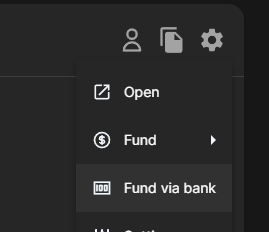
Fund via bank
Then follow all the steps for the bank transfer. Make sure to include all required information to avoid any delays in processing.
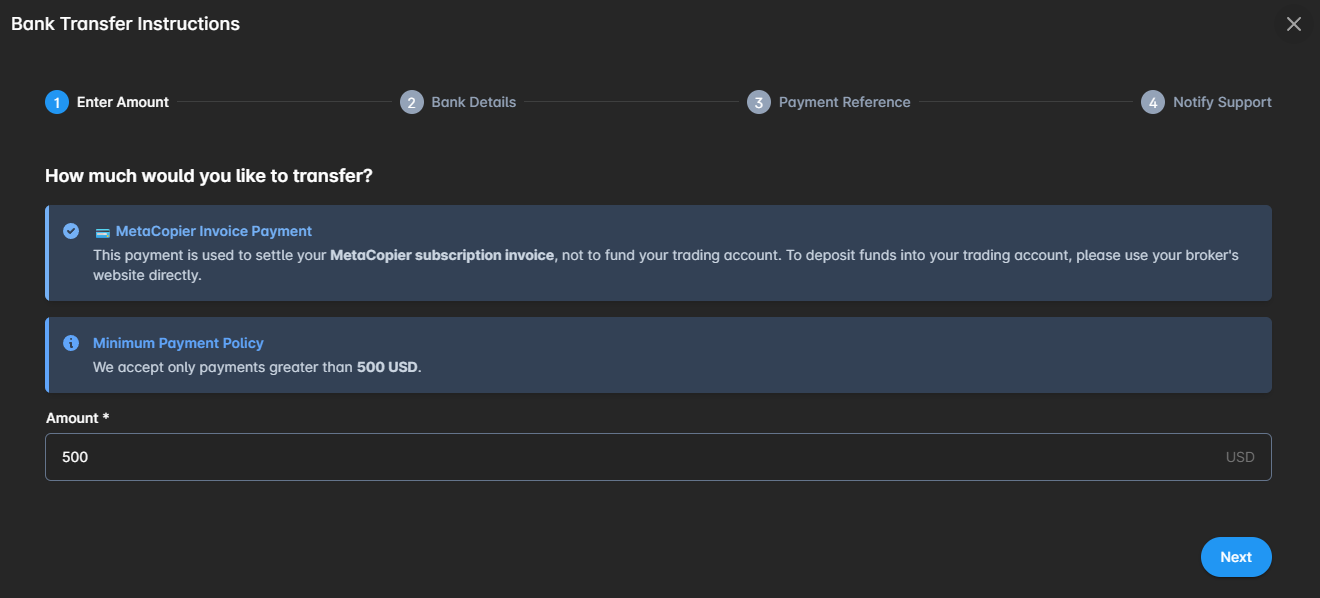
Bank transfer instructions
Withdraw unused balance
If you no longer need a project, you can withdraw its unused balance yourself. The money is refunded to the credit card or cards you used to fund the project, and the project is closed afterwards.
Withdrawing is also how you close the project and stop billing. For the wider procedure and the conditions that block it, see Cancel your subscription, stop billing or close your account.
The project is closed and deleted after the withdrawal
A withdrawal always pays out the full available amount and then deletes the project. This cannot be undone. Any balance that cannot be refunded (for example the trial credit) is lost. Other users with access to the project lose their access as well.
How to withdraw
- Delete all accounts in the project.
- Go to this page: https://metacopier.io/settings/projects
- Click on the project's Settings ⚙️ button -> Withdraw
- Check the overview. It shows your project balance, the trial credit that cannot be withdrawn, the refundable card payments, the usage of the current month, the fee and the amount refunded to each card.
- Confirm that the project will be closed and click Withdraw and close project.
If a withdrawal is not possible, the dialog tells you the reason.
Rules
Who can withdraw
- Only the project owner can withdraw.
- Your MetaCopier account must not be blocked, and the project must not have open invoices.
- Withdrawals are not available for white-label projects.
When you can withdraw
- The project must have no accounts. Delete all accounts first. You can withdraw right after deleting them.
- For dedicated projects, the project must have had no accounts since the 1st of the current month. Delete all accounts, then withdraw from the 3rd of the next month on.
- Withdrawals are not available on the 1st and 2nd of the month, because invoices are created on these days.
What can be refunded
- Only credit card payments made with Fund now within the last 120 days can be refunded.
- The payment must have been made by the project owner, with the email address of the MetaCopier account.
- Automatic invoice payments with a saved card, cryptocurrency payments and bank transfers cannot be withdrawn this way.
- Payments that were disputed or already refunded are not counted.
- The trial credit can never be withdrawn.
How much you receive
- The usage of the current month is charged with the withdrawal and is not refunded.
- The withdrawal amount is the lower of the two values: your balance minus the remaining trial credit and the usage of the current month, or the sum of the refundable card payments.
- If you still have trial credit, it is deducted from the usage of the current month first. Only the usage that the trial credit does not cover is kept back in addition.
- You cannot choose a lower amount. The full available amount is always withdrawn.
- A flat fee of 5% of the withdrawal amount is retained to cover payment provider fees. There is no administration fee and no minimum amount.
For example, your project balance is 100 USD and you funded it with 150 USD by card last month. One account was active until you deleted it on the 5th, which is 5 account days at 0.27 USD, so 1.35 USD is kept back. The withdrawal amount is 98.65 USD, the fee is 4.93 USD, and 93.72 USD is refunded to your card.
Refunds to your card
- The money goes back to the card that made the original payment. If you funded the project with several cards, the dialog shows each card with its last four digits and the amount it receives.
- The most recent payments are refunded first.
- You receive one refund per original payment, so a withdrawal can show up as several refunds on your statement.
- Refunds usually arrive within 5 to 10 business days, depending on your bank.
- After the withdrawal you receive a confirmation email with the amount refunded to each card, the fee, the usage of the current month and any balance that could not be paid out.
Did you fund your project with cryptocurrency or a bank transfer? These payments cannot be withdrawn here. Please send your refund request by email to support@metacopier.io before you close the project. Refunds are only processed to the original source of payment.