💲 Billing
Introduction
We believe in transparent, flexible, and usage-based pricing that adjusts to your needs, whether you're just starting out or scaling a complex trading setup. Our model is designed to give you full control over your costs, with no fixed monthly fees or hidden charges. Instead, you're billed based on actual usage, calculated daily, so you only pay for what you use.
This page provides a complete overview of how our billing system works. You’ll find clear breakdowns of pricing for shared and dedicated projects, optional pro features, dedicated IPs, and volume discounts. We also explain how billing is managed across regions, how to interpret your invoice, and where to find your real-time cost forecast. Plus, new users benefit from a $20 free trial credit to get started risk-free.
Subscription Model
Our pricing is built around a pay-per-account model, with costs calculated on a daily basis. Each account (whether a master or slave) is counted individually, and your monthly invoice reflects the average number of active accounts maintained throughout the month. This ensures pricing stays fair, proportional, and easy to understand.
For example, if you have 4 accounts connected for 15 days and 2 accounts connected for 30 days, the total usage is 120 account-days. This is calculated as:
- 4 accounts × 15 days = 60 account-days
- 2 accounts × 30 days = 60 account-days
- Total: 120 account-days
The cost is then 120 account-days × 0.27 USD, which equals USD 32.40.
On your invoice, the 120 account-days will be divided by the number of days in the month (e.g., 30 days), resulting in an average of 4 accounts (rounded).
Every deployment is billed as a full account-day, no matter how short it is.
If an account is deployed and then removed immediately, it will still count as 1 account-day on your usage calculation. The same rule applies when you deploy the same account more than once on the same day: each deployment is billed as its own full account-day, and removing and re-adding the account does not merge those deployments into a single day's charge.
For example, adding one account, deleting it and adding it again two more times during the same day results in 3 account-days (3 × 0.27 USD = 0.81 USD on a shared project), not 1.
Disconnected or inactive accounts will still be charged until they are completely removed from the platform.
Key Billing Details
- Payment Schedule: Billing occurs at the end of each month with no upfront charges.
- Currencies: Payments can be made in USD, EUR, or CHF, with no hidden fees or complex pricing structures.
- Free Trial: New users get a USD 20 credit for their first shared project to explore all features. To claim it, verify your mobile number by SMS before you create your first project. Each phone number can only be used once, and the trial can't be claimed anymore once a project was created without it.
Cost Forecast
We aim to be as transparent as possible, which is why we added a cost forecast feature. You can view the monthly cost forecast directly in the dashboard where all your projects are listed. Simply click on it to see more details.
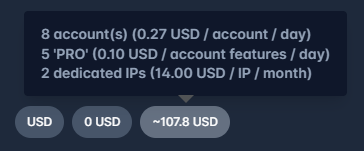
Monthly cost forecast in the dashboard
Alternatively, you can find it in the accounts overview at the top right corner.
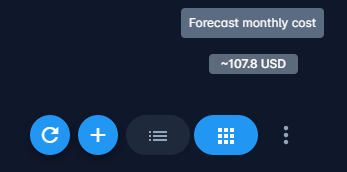
Monthly cost forecast in the accounts overview
Shared Project Pricing
In a shared project setup, multiple users share server resources, which allows us to keep costs low while still maintaining a reliable, high-performance environment suitable for most trading needs. Despite the shared nature of the infrastructure, all users enjoy isolated account configurations, ensuring both security and operational integrity.
Key Features
- New User Credit: USD 20 credit for all new users (this will be automatically added to your first project)
- Access: Includes all basic features, with optional pro features and dedicated IPs available for an extra cost.
- API and SDK Access: Access to our Rest API and SDKs.
- Unlimited Usage: No restrictions on usage.
- Support: Standard support included.
Pricing
- Rate: USD 0.27 per account/day, billed monthly.
- Pay-As-You-Go: Only pay for the days you use the service.
- No Volume Discounts: Shared projects do not offer volume-based discounts, regardless of the number of accounts used.
Dedicated Project Pricing
For professional traders, institutions, or power users who require maximum reliability and control, our dedicated project option offers a fully isolated server environment with resources reserved exclusively for your use. This ensures consistent and predictable performance, even during periods of high demand. Additionally, dedicated project users benefit from priority support, giving you faster response times and direct access to our technical team when it matters most.
Pricing
- Billing Per Project and Region: Charges apply based on the number of reserved accounts per region and project.
- Minimum Package: Starts with 25 accounts, with additional increments of 25 as needed.
- Example: If you have 4 accounts in New York, you’re billed for 25. If you have 42 accounts, you’re billed for 50.
- Adding accounts across regions (e.g., 15 in New York and 4 in London) will incur charges for separate packages in each region.
Switching from a shared to a dedicated project later will incur a migration fee. If you need to upgrade, please contact us for assistance.
Volume Discounts
The monthly costs below are calculated with 30 days.
| Accounts per project and region | Daily costs per account | Monthly costs |
|---|---|---|
| 1-25 | USD 0.32 | USD 240 |
| 26-50 | USD 0.31 | USD 465 |
| 51-75 | USD 0.30 | USD 675 |
| 76-100 | USD 0.29 | USD 870 |
| 101-125 | USD 0.28 | USD 1050 |
| 126-150 | USD 0.27 | USD 1215 |
| 151-175 | USD 0.26 | USD 1365 |
| 176-200 | USD 0.25 | USD 1500 |
| 201-225 | USD 0.24 | USD 1620 |
| 226-250 | USD 0.23 | USD 1725 |
| 251-∞ | USD 0.22 (minimum) | USD 1656-∞ |
Pro Features
Pro features can be added or removed at any time, giving you full flexibility. An additional fee of USD 0.10 per day applies to any account using pro features.
For dedicated projects, you will only be billed for the accounts that are actively using pro features.
EA Hosting
Every expert advisor hosted with EA hosting costs USD 0.23 per day (USD 6.90 per 30 days), calculated daily for as long as the deployment exists. It is its own invoice position on top of the account price and does not add the Pro feature fee.
Dedicated IP & My Home IP
Both IP options cost a flat rate of 6 USD per IP per month. Unlike accounts and pro features, they are not calculated on a daily basis, so the amount is never prorated. An IP added on the last day of the month still costs the full 6 USD.
Dedicated IP
If you require a dedicated IP address for your trading setup, it’s available at a flat rate of 6 USD per month. The cycle follows the calendar month, so every IP you still hold is charged again on the 1st. If you release an IP and order another one within the same month, both are charged.
My Home IP
The My Home IP feature costs the same 6 USD per month and appears in the same invoice position as the dedicated IPs.
Here the cycle is a rolling 30 days, counted from the day you added the feature, not from the 1st of the month. An IP added on the 20th therefore renews on the 20th of the following months. You are charged once per unique combination of host and port, regardless of how many accounts use it.
Taxes & VAT
All prices displayed on MetaCopier are fixed final service prices. The price you see is the total amount you pay, and any legally required VAT is already included in that price.
Are you a business customer looking for reverse-charge / B2B tax treatment? See the dedicated section on our B2B page:
Unpaid Invoices
Invoices are generated on the 2nd of each month. If an invoice stays unpaid (OPEN), MetaCopier escalates automatically, counted from the invoice date. The stages are checked a few times a week, so they may take effect a few days after the day shown.
| Days after the invoice date | What happens |
|---|---|
| ~7 | A reminder email is sent. Your account is not blocked yet, but new projects and accounts can no longer be created. |
| ~12 | Your account is blocked. You cannot use the platform until the amount is settled. Trading continues, nothing is deleted. |
| ~22 | The copiers are paused (monitor-only) so no new trades are copied. Accounts that still hold open or pending positions keep running until they are flat. |
| ~30 | The project and all of its accounts are removed, to free server capacity for paying customers. The project disappears from your dashboard. |
The last step cannot be undone. Nothing is kept as a draft, a deleted project cannot be restored, and paying afterwards does not bring it back: you have to add the accounts again from scratch. Paying stops the escalation and clears the account block, but paused copiers or a removed project are not restored automatically.
Once an open invoice is paid, allow a few minutes for the payment to be processed. The account block is then lifted automatically and you can log in and add accounts again — no manual reactivation is required.
Pay in time to avoid this. Keep a valid credit card with 3D Secure enabled on the project, or fund the project before the invoice is created. A failed charge can be retried with Request payment in the project's Invoices section. See Payment methods.
To stop billing yourself and close a project, see Cancel your subscription, stop billing or close your account.