Break Even
Overview
A Break Even feature automatically sets the stop-loss to the entry price (or slightly in profit) once a position reaches a specified number of points in profit. This ensures you’re no longer risking your initial capital if the market reverses while locking in a small profit or minimizing the chance of turning a winning trade into a losing one.
By using Break-even, you can:
- Protect Profits: Secure at least the initial investment once the trade is in profit.
- Limit Risk: Eliminate your exposure or set a tiny cushion just above break-even.
- Automate Risk Management: Reduce the need to monitor positions constantly to move the stop-loss manually.
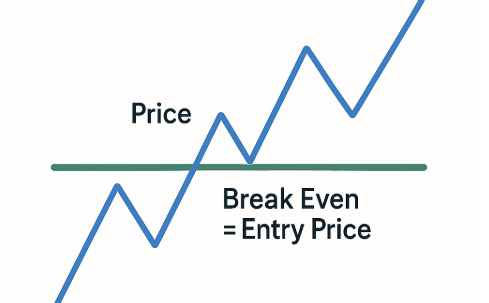
Break Even
You have to use this feature at the correct level:
- For a master account or an account where you place trades manually, you have to set it at the account level.
- For an account that receives trades through a copier (such as a slave account), you have to set it on the copier.
We use points rather than pips for our break even and trailing stop functions because points provide a consistent, absolute measure of price movement across different assets. This approach simplifies setting stop levels since points represent a fixed unit regardless of an asset’s decimal format.
Examples:
- XAU/USD (Gold):
One pip is typically 0.10 (10 cents). So a 40-pip movement equals 4.0 points. Using points standardizes the stop level regardless of the pip value. - EUR/USD:
One pip is generally 0.0001. In pairs quoted with four decimals, 1 pip equals 1 point, so a 40-pip move equals 40 points.
How It Works
- Trigger in Points: The profit threshold (in points) at which the Break Even logic activates. When the position moves this far into profit, the stop-loss automatically shifts to reduce/eliminate your risk.
- Stop Loss in Points: The exact stop-loss placement (in points from the entry price) once Break Even is triggered. A typical setup is to place the stop-loss exactly at the entry price or a few points above/below it to ensure a tiny buffer in profit.
- Reverse (legacy toggle): If enabled and no dedicated reverse fields are set, the break-even logic operates in reverse using the Trigger/Stop Loss values above. When the dedicated reverse fields below are configured, this toggle is ignored.
- Reverse Trigger in Points: The number of points the trade must move against the position (in loss) to trigger the reverse break-even. When set together with Reverse Stop Loss in Points, both normal and reverse break-even run simultaneously on the same position. Leave empty to disable.
- Reverse Stop Loss in Points: The distance in points from the entry price at which the take profit will be placed after the reverse break-even is triggered.
- Symbol-Specific Settings: You can configure Break Even settings on a per-symbol basis, ensuring that more volatile instruments or special cases have tailored values.
Simultaneous Mode: You can now run both normal break-even (move SL when in profit) and reverse break-even (move TP when in loss) at the same time on the same slave/account. Simply configure the dedicated Reverse Trigger in Points and Reverse Stop Loss in Points fields alongside the normal trigger and stop loss values.
Configuration
Enabling the Feature (Account-Level)
- In MetaCopier, navigate to your Account and open Features.
- Click Add Feature (or edit an existing one) and choose Break Even.
- Configure:
- Trigger in Points (e.g.,
30) - Stop Loss in Points (e.g.,
20)
- Trigger in Points (e.g.,
- Click Save to apply the feature to the account.
Enabling the Feature (Copier-Level)
- Go to Copiers under the desired account.
- Access the Features list for a specific copier.
- Create or edit a Break Even feature with your desired Trigger and Stop Loss values.
- Click Save.
Per-Symbol Configuration
- If you want different Break Even logic for a specific symbol, go to Symbols Configuration under the Break Even settings.
- Click Add Symbol Configuration to open a dialog for that symbol, then adjust the Trigger in Points and Stop Loss in Points.
- Save your changes to apply them. MetaCopier will use the symbol-specific settings for that instrument only.
Example Use Cases
- Basic Break Even
- Trigger in Points: 30
- Stop Loss in Points: 0
Behavior: Once the position is 30 points in profit, the stop-loss is set exactly at the entry price, removing all risk.
- Lock Small Profit
- Trigger in Points: 40
- Stop Loss in Points: 10
Behavior: When the position gains 40 points, the stop-loss is placed 10 points into profit. If the market reverses, you still exit with a 10-point gain.
- Per-Symbol Override
- Global Break Even:
Trigger = 30,Stop Loss = 5 - EURUSD Override:
Trigger = 25,Stop Loss = 10
Behavior: Every symbol uses a global Break Even of 30/5, but EURUSD triggers Break Even sooner (at 25 points) and locks a bigger profit margin (10 points).
- Global Break Even:
- Simultaneous Normal + Reverse Break Even
- Trigger in Points: 30
- Stop Loss in Points: 5
- Reverse Trigger in Points: 40
- Reverse Stop Loss in Points: 15
Behavior: When the position gains 30 points of profit, the stop-loss moves to 5 points above entry (normal break-even). Independently, if the position moves 40 points into loss, the take profit is set to 15 points from entry (reverse break-even). Both protections are active simultaneously on the same position.
Best Practices & Tips
- Start with a Demo: Test your Break Even thresholds on a practice account to see if they suit market volatility.
- Combine with Trailing Stop: After Break Even triggers, a trailing stop can lock in additional gains.
- Avoid Overly Tight Stop: Setting
Stop Loss in Pointstoo close (e.g., 1 point above entry) can cause unnecessary stop-outs in choppy markets. - Monitor Volatility: More volatile symbols may need higher trigger thresholds to avoid premature stop-outs.