Symbol mapping
The system attempts to automatically detect symbol mappings across different platforms. If this process fails, you can contact us for assistance or define the mapping manually as described here.
The symbol mapping function allows users to establish a connection between symbols across different trading platforms. This feature is particularly useful when the symbols on the master and slave accounts differ but represent the same financial instrument.
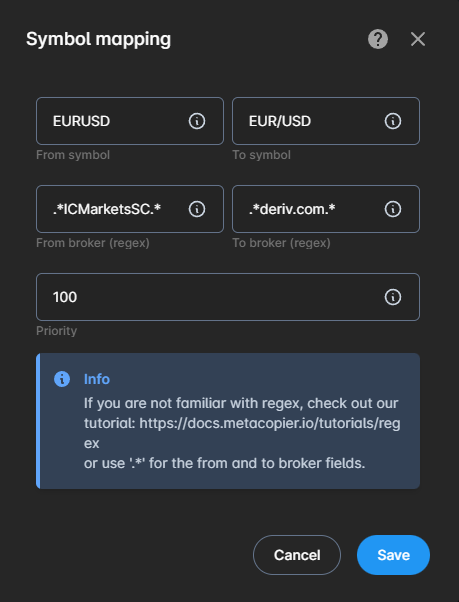
By mapping symbols, the copier ensures accurate trade replication by recognizing equivalent symbols and executing trades accordingly. For example, if EUR/USD is represented as "EURUSD" on the master account and "EUR/USD" on the slave account, the symbol mapping function allows users to link these symbols, enabling seamless trade copying between accounts despite the symbol variations.
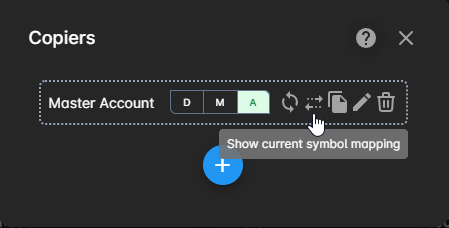
To show the current symbol mapping click on button on the copiers list.
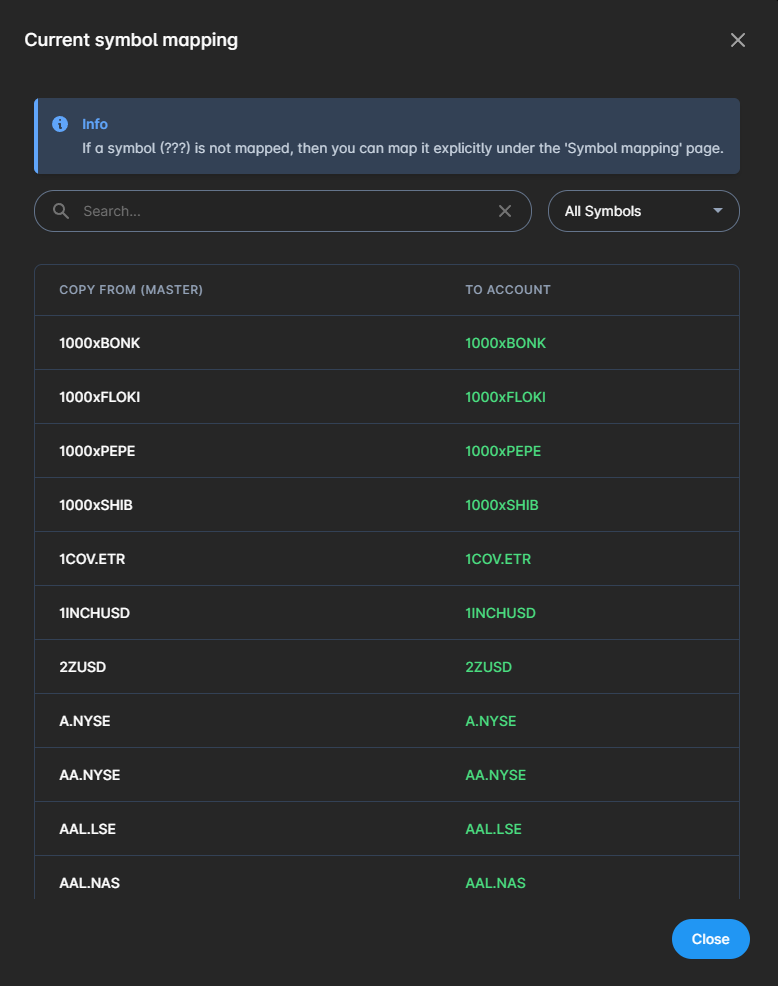
A new window opens with a list of symbols and their mapping. You can filter to the desired symbol.
The column "Copy from (master)" always lists the symbols of the master (source) account. This is also a quick way to check that your copier runs in the intended direction: if you see the symbols of the account you wanted to copy to, the copier was created on the wrong account. See #copy-direction-master-and-slave.
If a mapping is missing or wrong go to the Symbol mapping page and add a new mapping similar to the example provided.
Settings
- From symbol: Specify the symbol name from the source trading platform.
- To symbol: Define the corresponding symbol name on the target trading platform.
- From Broker (Regex): Set a regular expression pattern to match symbols from the source broker. This allows for flexible matching of symbols based on patterns rather than exact matches
- To Broker (Regex): Establish a regular expression pattern to match symbols from the target broker, offering the same flexibility for symbol matching.
- Priority: Assign priority levels to symbol mappings. In case of multiple mappings matching a symbol, the priority determines which mapping takes precedence (lower number means higher priority).
If you need some help with regex filters we have also this page with some examples
Bulk mapping and wildcards (all FX pairs / all symbols)
There is no wildcard mapping and no bulk mapping for symbol names. A mapping always links one exact symbol on the master to one exact symbol on the follower:
- From symbol and To symbol are exact names and are not regular expressions.
EURUSD.porEURUSD.*are treated as literal text. - The only regex fields are From Broker (Regex) and To Broker (Regex). They restrict a mapping to matching broker names (use
.*to apply it to every broker) — they match brokers, not symbol names.
So you cannot map "every .p symbol to .c" or "all FX pairs" with a single entry. In practice you usually do not have to:
- MetaCopier already tries to detect the mapping automatically and ignores many common naming differences, including trailing tokens such as
.p,.m,.i,.r,pro,-VIP,-ECNand-STD, and account-type suffixes such asc,mandz. For example, a masterEURUSD.pand a followerEURUSD.c(orEURUSDc) are normally matched without any manual entry. - Check the result on the copier with View current symbol mapping. Only the symbols that are still missing need a manual entry.
- For those, use the AI Assistant when the system has flagged the symbol as missing, or add the mapping manually, one symbol pair at a time.
- If you keep several projects, use Copy to project on the Symbol mappings page to copy a whole set of selected mappings to another project in one step.
- When you automate through the API, create one mapping per call (
POST /projects/{projectId}/symbolMappings); there is no bulk endpoint.
AI-Assisted Symbol Mapping
Overview
The AI-Assisted Symbol Mapping feature helps you automatically generate symbol mappings between master and slave accounts using artificial intelligence. This feature is particularly useful when you have missing symbol mappings that prevent proper trade replication between accounts.
What It Does
When trades are replicated from a master account to a slave account, MetaCopier needs to know how symbols map between the two brokers. For example, "EURUSD" on one broker might be "EURUSD.m" on another. The AI Assistant analyzes the available symbols on both accounts and intelligently suggests the most appropriate mapping.
How to Access
Important: The AI Assistant can only map symbols that have been automatically detected as missing by the system. Missing symbols are detected during actual trade replication when a trade cannot be copied due to a symbol mismatch between master and slave accounts.
- Navigate to your project's Symbol Mappings section
- Click the AI Assistant button
- The AI-Assisted Symbol Mapping dialog will open
Using the AI Assistant
Step 1: Select the Master Account
Choose the master account (source) that has missing symbol mappings. The dropdown will only show accounts that have detected missing symbols.
Note: The system automatically detects missing symbol mappings when trades fail to replicate due to symbol mismatches.
Step 2: Select the Missing Symbol
After selecting a master account, choose which missing symbol you want to map. The dropdown will display all symbols that are currently unmapped for the selected account.
Step 3: Review the Destination Account
The "To Account" field automatically displays the slave (destination) account that needs the mapping. This is determined from the account that reported the missing symbol.
Step 4: Generate AI Mapping
Click the AI Map button to generate an intelligent suggestion. The AI will:
- Analyze all available symbols on the master account
- Analyze all available symbols on the slave account
- Use pattern recognition and trading symbol conventions to suggest the best match
- Display the suggested mapping in the "Suggested Mapping" field
Step 5: Create the Mapping
If you're satisfied with the AI suggestion:
- Review the suggested mapping displayed in the "Suggested Mapping" field
- Click Create Mapping to save it to your project
- The mapping will be created with:
- Source symbol: The missing symbol from the master account
- Target symbol: The AI-suggested symbol
- Broker pattern:
.*(applies to all brokers by default) - Priority: 100